1. 點選"專案名稱" > "Add" > References。

2. 按下"Browse...",選擇Excel執行檔路徑,一都安裝在"C:\Program Files (x86)\Microsoft Office\Office14\EXXEL.EXE"。
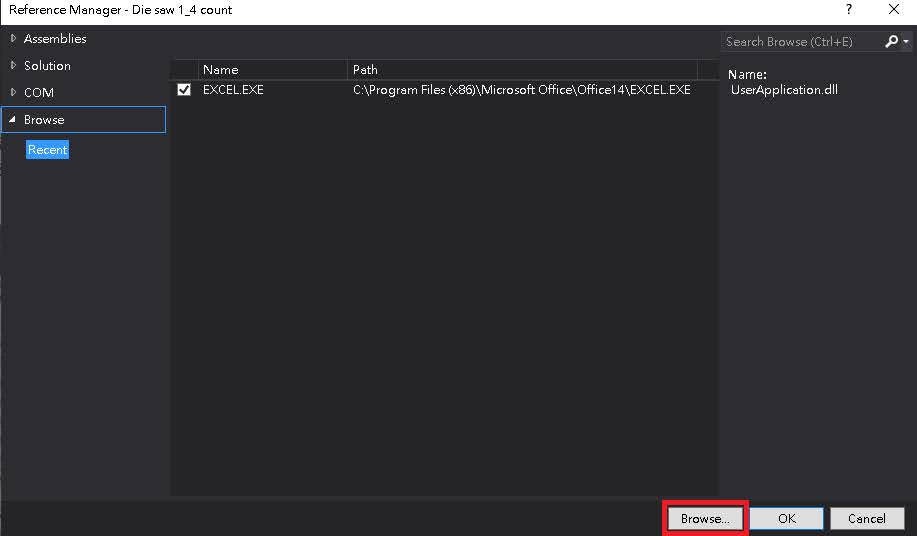

1. 點選"專案名稱" > "Add" > References。




| KeyEventArgs類別的屬性: | |
| Alt | 取得值,指出是否按下 ALT 鍵。 |
| Control | 取得值,指出是否按下 CTRL 鍵。 |
| Handled | 取得或設定值,指出是否處理事件。 |
| KeyCode |
取得 KeyDown 或 KeyUp 事件的鍵盤程式碼。 |
| KeyData |
取得 KeyDown 或 KeyUp 事件的按鍵資料。 |
| KeyValue |
取得 KeyDown 或 KeyUp 事件的鍵盤值。 |
| Modifiers | 取得 KeyDown 或 KeyUp 事件的輔助鍵旗標。 這些旗標是表示按下 CTRL、SHIFT 和 ALT 哪些按鍵組合。 |
| Shift | 取得值,指出是否按下 SHIFT 鍵。 |
| SuppressKeyPress |
取得或設定值,指出按鍵事件是否應該傳遞至基礎控制項。 |
| Keys Enum(鍵盤列舉) | |
| 列舉常數值 | KeyCode |
| Keys.D0~Keys.D9 | 48~57 |
| Keys.A~Keys.Z | 65~90 |
| Keys.F1~Keys.F12 | 112~121 |
| Keys.Left~Keys.Right | 37、39 |
| Keys.Up~Keys.Down | 38、40 |
| Keys.Enter~Keys.Space | 13、32 |
| Keys.ShiftKey | 16 |
| Keys.ControlKey | 17 |
| Keys.Escape | 27 |


1
2
3
4
5
6
7
8
9
10
11
12
13
14
15
16
17
18
19
20
21
22
23
24
25
26
27
28
29
30
31
32
33
34
35
| using System;using System.Collections.Generic;using System.ComponentModel;using System.Data;using System.Drawing;using System.Linq;using System.Text;using System.Threading.Tasks;using System.Windows.Forms;using System.Runtime.InteropServices;namespace WindowsFormsApplication1{ public partial class Form1 : Form { [DllImport("ConsoleApplication1.dll", EntryPoint = "add")] public static extern int add(int x, int y); public Form1() { InitializeComponent(); } private void button1_Click(object sender, EventArgs e) { int a, b; a = Int32.Parse(textBox1.Text); b = Int32.Parse(textBox2.Text); textBox3.Text = add(a, b).ToString(); } }} |


